TEKNIQ ONLINE

From IFC model to workshop drawing and PDF.

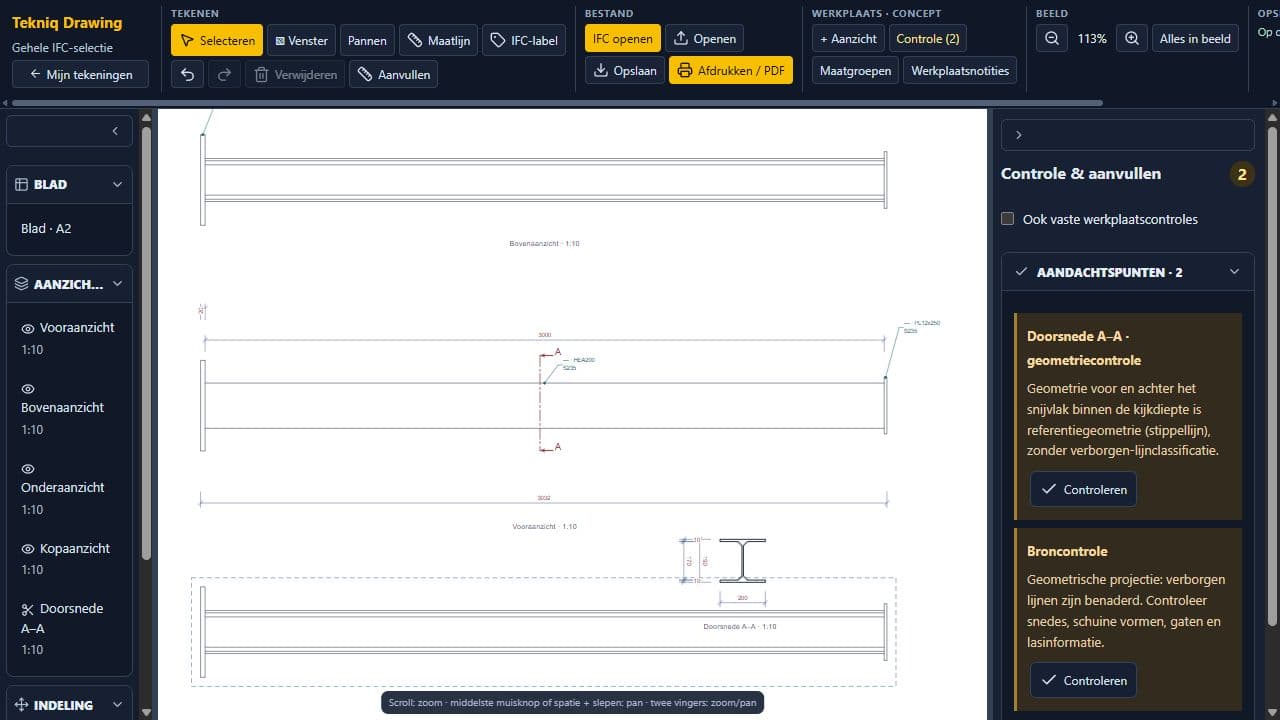
A 3D model and a readable drawing sheet serve different purposes. Tekniq Drawing lets you develop an editable drawing from IFC in your browser. Create views, add dimensions and sections and review the sheet layout. Export the drawing sheet to PDF for discussion or the next stage of production preparation.

Open Tekniq Drawing Watch the product demonstration (Dutch)
IFC model developed into a drawing sheet in Tekniq Drawing
TEKNIQ / SOFTWARE IN PRACTICE
01

Use IFC as the starting point for a drawing

Start with an IFC model and decide which components to show on the sheet. A view makes the geometry readable from a chosen direction. The editable drawing workspace helps translate model information into a drawing suited to your task. Its usefulness also depends on the quality and contents of the supplied IFC file.

02

Develop views, dimensions and sections

Combine views with dimensions and sections to explain a component's assembly. Develop the drawing around the reader's needs: the main shape, relevant dimensions and details hidden in a single view. The help film demonstrates the transition from IFC to views and a section, including dimension groups and sheet review.

03

Share a reviewed drawing sheet as PDF

Review the placement of views, dimensions and sections before exporting the drawing as PDF. Use that output for discussion or documentation in your workflow. For your own drawing standards, templates or additional integrations, we assess the setup required together. A drawing still needs technical review before use as a final manufacturing document.

PRACTICAL QUESTIONS

Before we get started.

Do I need Tekla to use Drawing?

Drawing is an online drawing workspace that works from an IFC model. Opening and detailing take place in the browser. Usable model content depends on the supplied file and supported capabilities.

Can I export the result as PDF?

Yes. You can export a drawing sheet containing the developed views, dimensions and sections to PDF. The help film demonstrates this workflow using an IFC demo model.

YOUR NEXT STEP

Let’s make it work.

Tell Tim about your product, your current workflow and the output you need. Together we can define a practical next step.

Tell us about your idea.

Send Tim a message, right here.

We use your details to respond to your enquiry. No newsletter subscription.