TEKNIQ ONLINE

Design masonry. Control every brick.

Tekniq Masonry makes masonry construction visible. Configure façades, bricks, joints, bonds and openings in one online workspace. The façade model helps you review the layout and forms the basis for brick schedules and drawings.

Open Tekniq Masonry
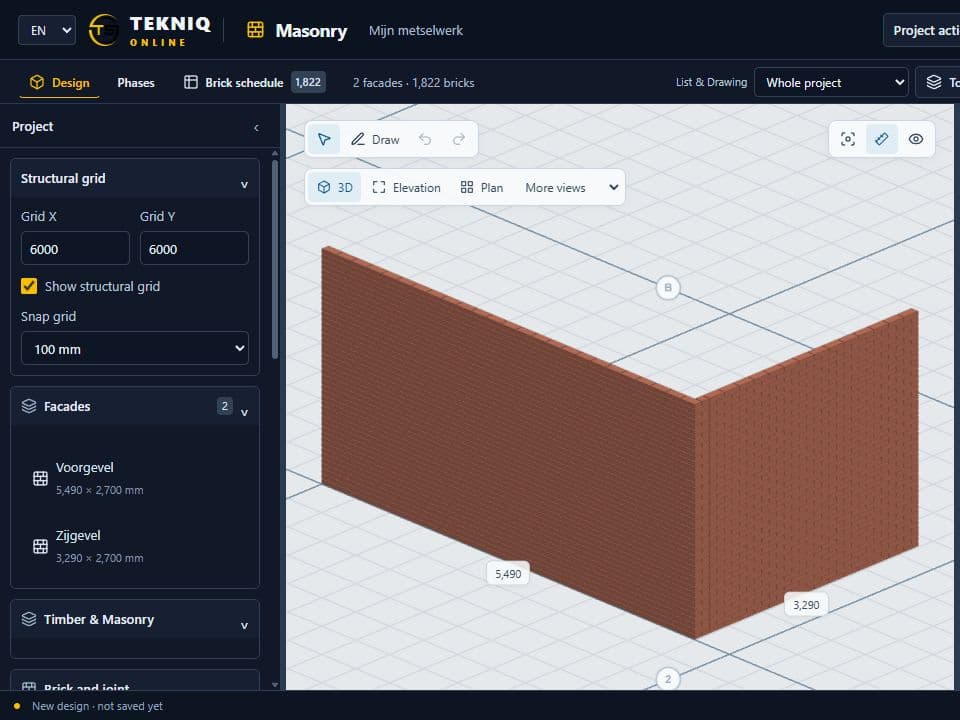
Façade model with bricks and openings in Masonry
TEKNIQ / SOFTWARE IN PRACTICE
01

From façade shape to brick layout

Draw façades and set materials, brick dimensions, joints and bonds. The geometry shows how the brick layout relates to the selected dimensions. Openings form part of the same façade assembly and can be inspected and edited in the model.

02

One model for review and output

The 3D view and brick schedule use the same calculated bricks, making quantities traceable to the design. Façade information can also be used in the drawing workspace, including the configured brick-type colours.

03

Part of the online trio

Masonry shares its core interaction with Timber and Rebar. Building exchange with Timber provides a reference from the other discipline. For a specific production or Tekla integration, we separately establish the required data and outputs.

PRACTICAL QUESTIONS

Before we get started.

Can I create brick schedules?

Yes. Masonry uses the calculated bricks for its brick schedule. Check the selected materials, dimensions and applied bond, since these determine the result together.

Where can I explore the configurator?

Open masonry.tekniq.nl to explore the online workspace. Use the example and tour to discover façades, bonds, openings and schedules.

YOUR NEXT STEP

Let’s make it work.

Tell Tim about your product, your current workflow and the output you need. Together we can define a practical next step.

tim@tekniq.nl ↗