CONNECTED ENGINEERING

Your construction product. Configurable online.

A good configurator makes specialist knowledge usable. Your customer or colleague chooses dimensions, materials and options while the software applies your product rules. Tekniq develops this combination of an understandable workspace and engineering depth.

Discuss your process
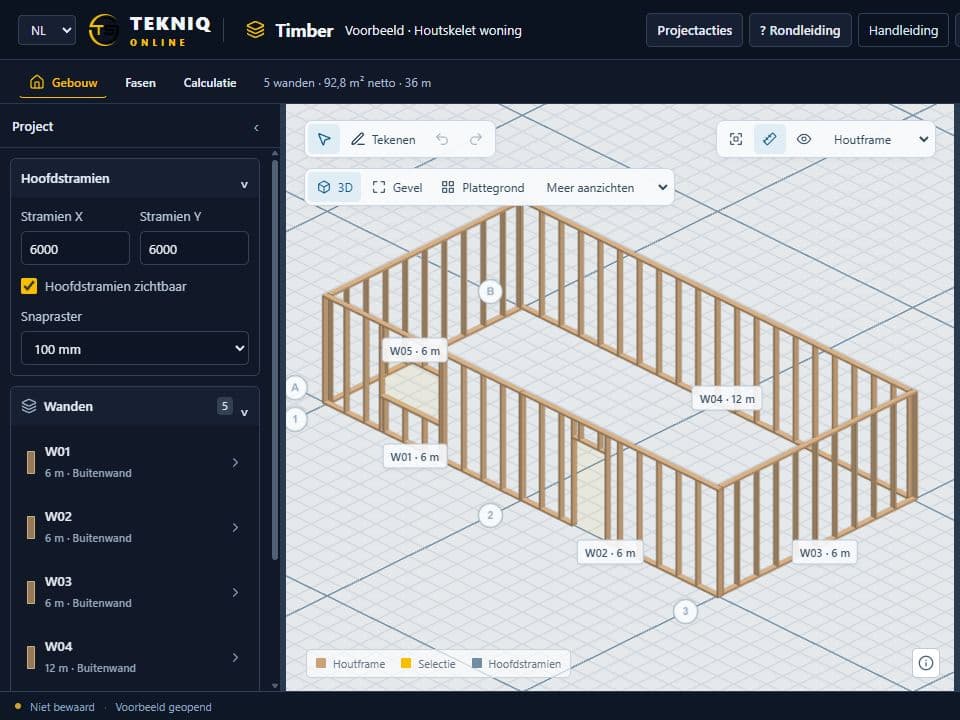
House framing in Tekniq Timber
TEKNIQ / SOFTWARE IN PRACTICE
01

Start with the product rules

Which combinations are allowed? Which components change when a dimension changes? Where are the exceptions? Together we map this knowledge. The configurator is built around your product, with inputs, checks and model views suited to its users.

02

A 3D model that can move downstream

The visible configuration is the starting point. For your process, we develop the step into engineering in Tekla and onwards to drawings, manufacturing data and machinery. We establish which data is needed and what the receiving system expects.

03

Existing software as a concrete starting point

Timber, Masonry and Rebar show specialist online workspaces for timber, masonry and reinforcement. For your own configurator, we assess which existing capabilities fit and which product logic needs custom development. The integration with your production process is specified and tested separately.

PRACTICAL QUESTIONS

Before we get started.

Which construction products can this support?

Our experience covers timber, concrete, steel, aluminium and reinforcement. Suitability depends on your product rules and required inputs and outputs. A sample product and an existing workflow are a useful starting point.

Does every user need Tekla?

The online configurator runs in the browser. The engineering integration and any Tekla environment are designed as part of the solution. Licensing and infrastructure requirements depend on that setup.

YOUR NEXT STEP

Let’s make it work.

Tell Tim about your product, your current workflow and the output you need. Together we can define a practical next step.

tim@tekniq.nl ↗