TEKNIQ ONLINE

Configure reinforcement. From beam to cage plan.

Tekniq Rebar is the online workspace for concrete beams and reinforcement cages. Configure beams and reinforcement, inspect concrete, longitudinal bars and stirrups in 3D, and place cages in a plan. Review both individual components and the overall arrangement.

Open Tekniq Rebar
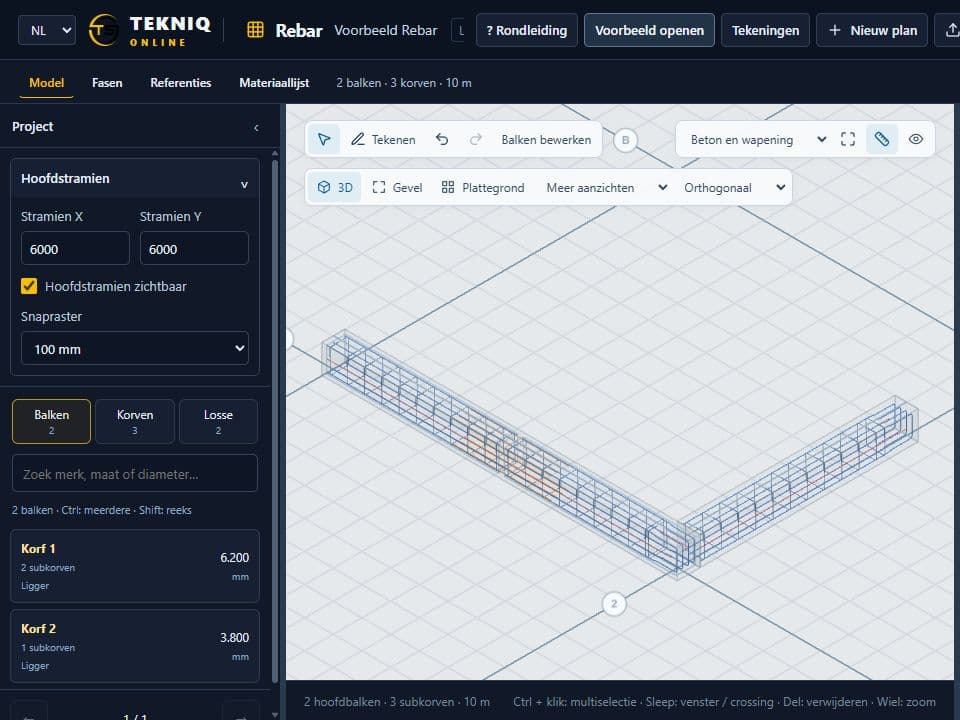
Concrete beams and reinforcement in the Rebar workspace
TEKNIQ / SOFTWARE IN PRACTICE
01

Inspect concrete and reinforcement together

A cage is easier to understand when its components are visible in context. Rebar provides a 3D view of the beam, longitudinal bars and stirrups. Work with the selected component’s settings and inspect its assembly in the model.

02

From an individual cage to a coordinated plan

In the placing workspace, arrange beams and cages in a cage plan. The overview and details of the current selection sit alongside each other. Settings and document exports help you carry the design into the next step of your workflow.

03

Engineering expertise behind the configuration

Tekniq’s experience with reinforcement and custom Tekla software underpins Rebar. For your particular route into Tekla, manufacturing data or machinery, we establish the integration required. Engineering review and verification of final outputs remain part of your application workflow.

PRACTICAL QUESTIONS

Before we get started.

Where can I open Rebar?

The online workspace is available at rebar.tekniq.nl. Use the tour to explore beam settings, model views and the cage plan.

Can our own settings be incorporated?

Discuss your beam types, reinforcement conventions and required documents with Tekniq. We assess which capabilities are available and which adaptations or integrations your process needs.

YOUR NEXT STEP

Let’s make it work.

Tell Tim about your product, your current workflow and the output you need. Together we can define a practical next step.

tim@tekniq.nl ↗