TEKNIQ ONLINE

Inspect PXML and reinforcement data in 3D.

Understanding a manufacturing file is difficult when you can only see individual values. Tekniq PXML brings reinforcement data and model views together. Open the data, inspect bars and bending segments and compare them with the PXML output. The online workspace helps engineers and production planners understand the reinforcement handover to production.

Open Tekniq PXML Watch the product demonstration (Dutch)
Reinforcement model and manufacturing data in Tekniq PXML
TEKNIQ / SOFTWARE IN PRACTICE
01

Bars and bending segments alongside the data

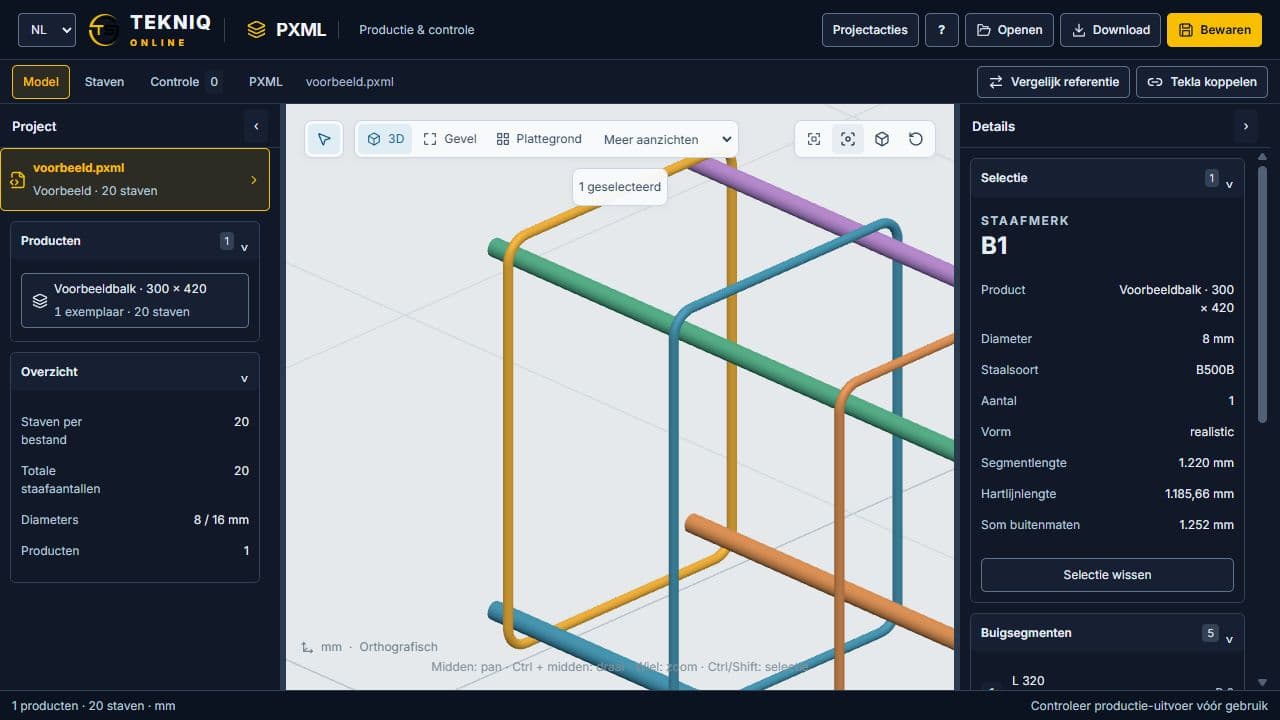
Inspect a bar shape in 3D and review its associated data. With the model and data in the same workspace, you can investigate an unusual segment more directly. The PXML workspace focuses on reading and inspecting reinforcement data; the geometry makes the information easier to understand than a file containing only numbers.

02

Review output before the production handover

Use the view to assess PXML output alongside bar data. For a new production workflow, agree the inputs, units and file conventions with Tekniq. Visual inspection helps identify differences but does not confirm that every machine can process the file. The receiving software and machine determine the required output.

03

Rebar, Tekla and PXML each have a role

Rebar is the workspace for configuring beam cages; PXML focuses on reinforcement data and output inspection. For custom workflows from Tekla to the factory floor, we investigate the complete data handover. Bring a representative source file and the receiving system specification so we can assess support, missing data and necessary adaptations.

PRACTICAL QUESTIONS

Before we get started.

Can I preview PXML with an example?

The help film demonstrates a sample beam, bar data, bending segments and output inspection. Open the workspace to check the access available to your organisation.

Can PXML control our bending machine directly?

This must be established for each machine and file specification. Discuss supported inputs and outputs with Tekniq; a visually correct model alone does not constitute a validated machine integration.

YOUR NEXT STEP

Let’s make it work.

Tell Tim about your product, your current workflow and the output you need. Together we can define a practical next step.

Tell us about your idea.

Send Tim a message, right here.

We use your details to respond to your enquiry. No newsletter subscription.